
Fcitx Pinyin - Complete vs. Incomplete
2019-03-22
I accidentally change the configuration in fcitx. Strange things happened. Now I fixed it.
fcitx is a famous input method framework for Linux. Many languages use fcitx as the input methods backend. In my case, I use Pinyin input methods. There are three Pinyin input methods installed on my Fedora machine.
PinyinsunpinyinLibPinyin
Today I accidentally changed the configuration of the fcitx, actually a bunch of settings all at once. After that I could not get the correct character candidates if I typed an acronym for a specific phase. I was to post an image of this case. But the screenshot failed to capture it (conflict with fcitx). I intended to type “cf” for “chifan”, but not a single Chinese character came out.
I double checked. This only happened to Pinyin and LibPinyin, while sunpinyin works normally.
After debugging one by one, I identified the cause.
Just confirm that you choose “enable incomplete” Pinyin mode.
- In
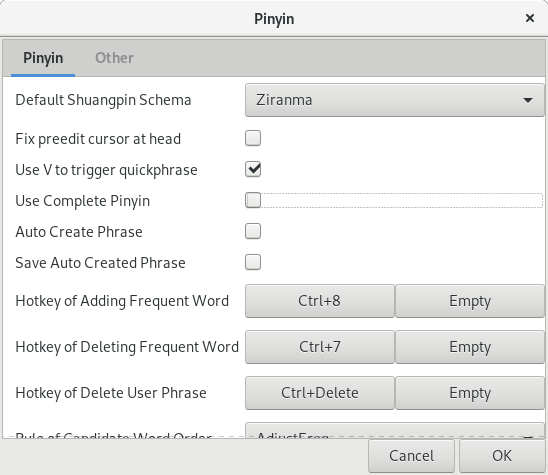
Pinyin, do not check “Use Complete Pinyin”. - In
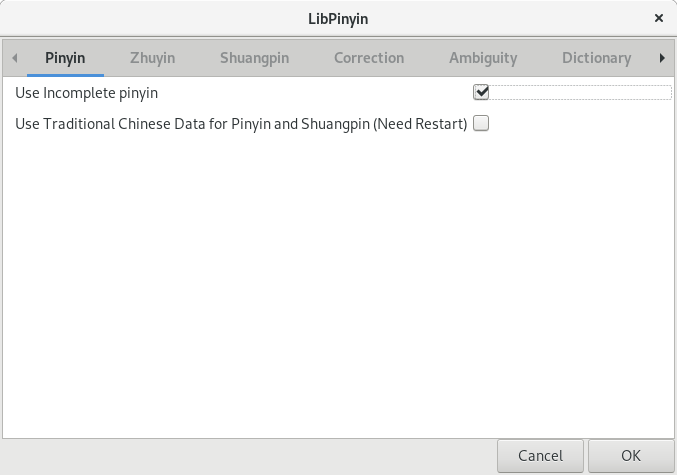
LibPinyin, do check “Use Incomplete pinyin”.
That’s it.
Configuration of Pinyin:
Configuration of LibPinyin:
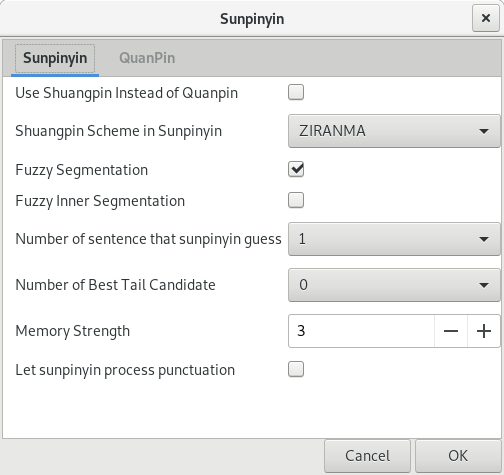
Configuration of sunpinyin (You don’t have this option here):
- ← Older-DEBUG > Resolve Character Decoding Error in Spacemacs on Windows
- Emacs Editable Dired Mode Demo-Newer →